SpaceBroom for Mac
For developers.Safely cleaned up.
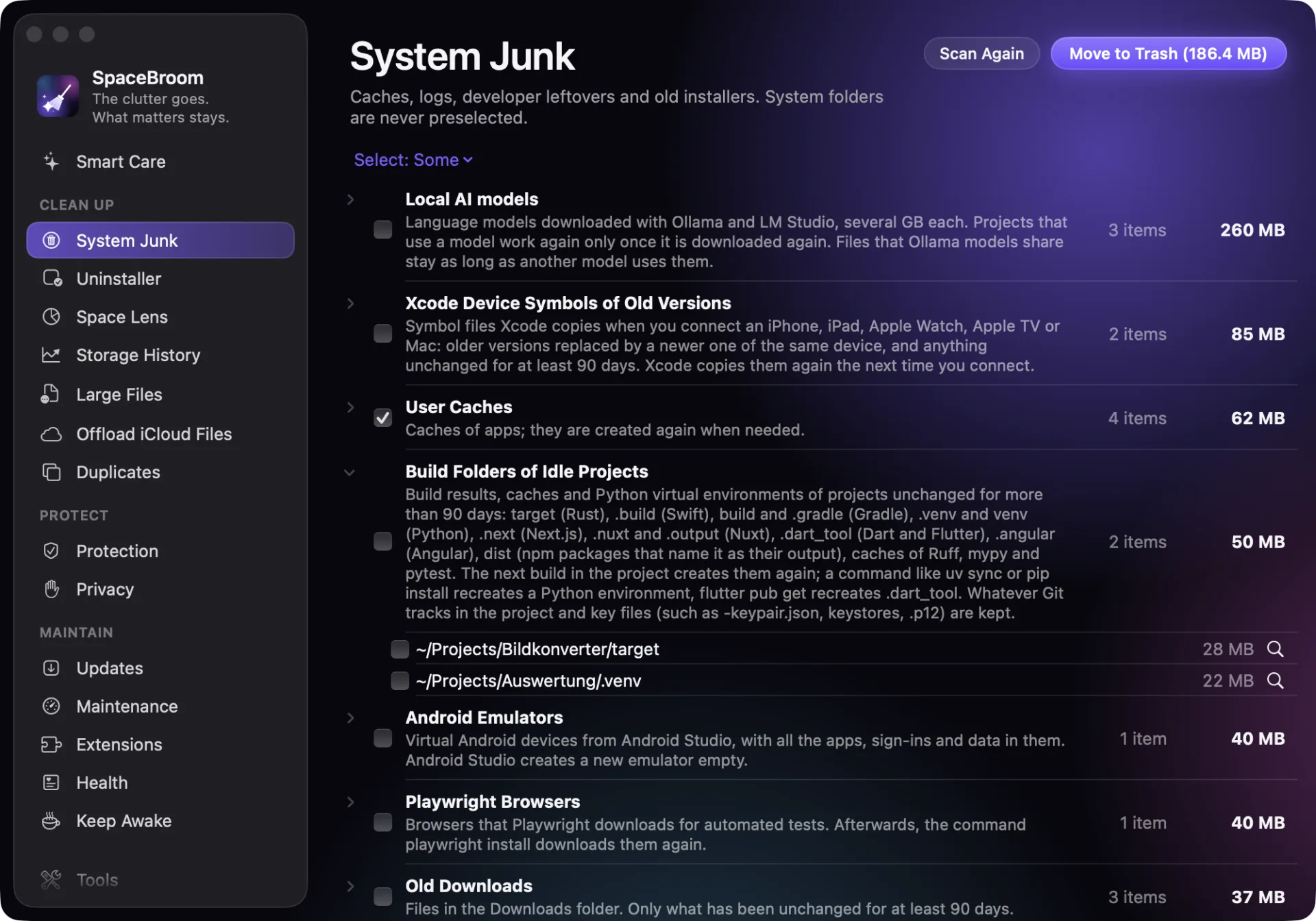
SpaceBroom finds what Xcode, Node, Rust, Python, Docker and AI tools leave behind on your Mac. Whatever your Git state, an open AI session or a running Xcode still needs stays where it is.
Measured
What piles up on a developer's Mac.
- in 23 developer categories together
- 160.5 GB
- npm cache
- 87.4 GB
- uv cache
- 19.8 GB
- Android emulators
- 16.1 GB
- Xcode device symbols of old versions
- 6.0 GB
- node_modules from 5 idle projects
- 2.8 GB
Measured on 11 November 2026 with SpaceBroom on the Mac the app is built on, read only. Only part of it is preselected: emulators, device symbols, the uv cache and node_modules are yours to pick.
Mac
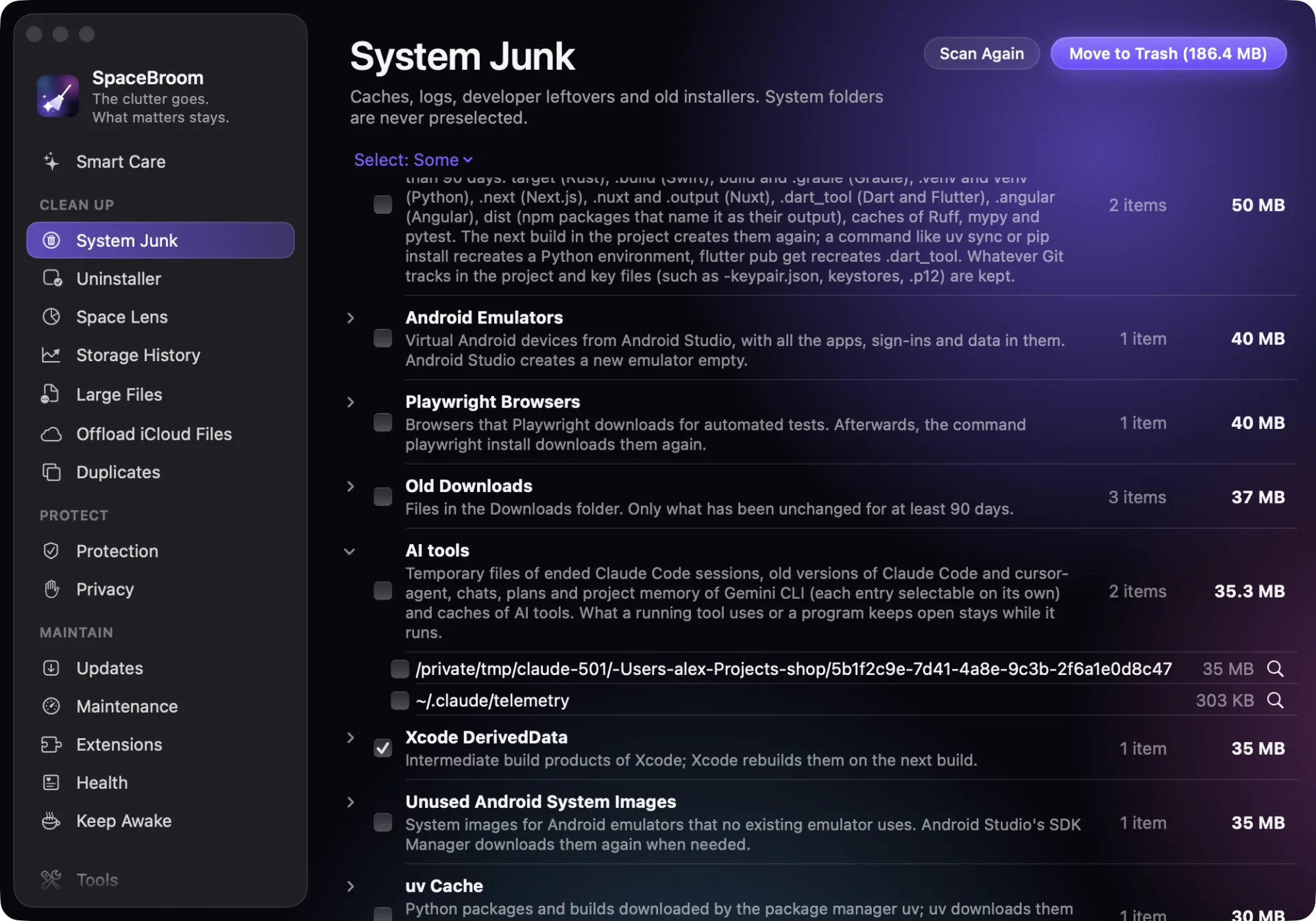
AI tools and local models
Clean up without disturbing a running session.
Temporary files of ended Claude Code sessions, old versions of Claude Code and cursor-agent, caches of Codex and opencode, chats and plans of Gemini CLI, each entry on its own. Whatever a running tool uses stays. Plus language models from Ollama and LM Studio, often several GB each; before removing them the app reminds you that projects may still use them. None of it is preselected.
Mac
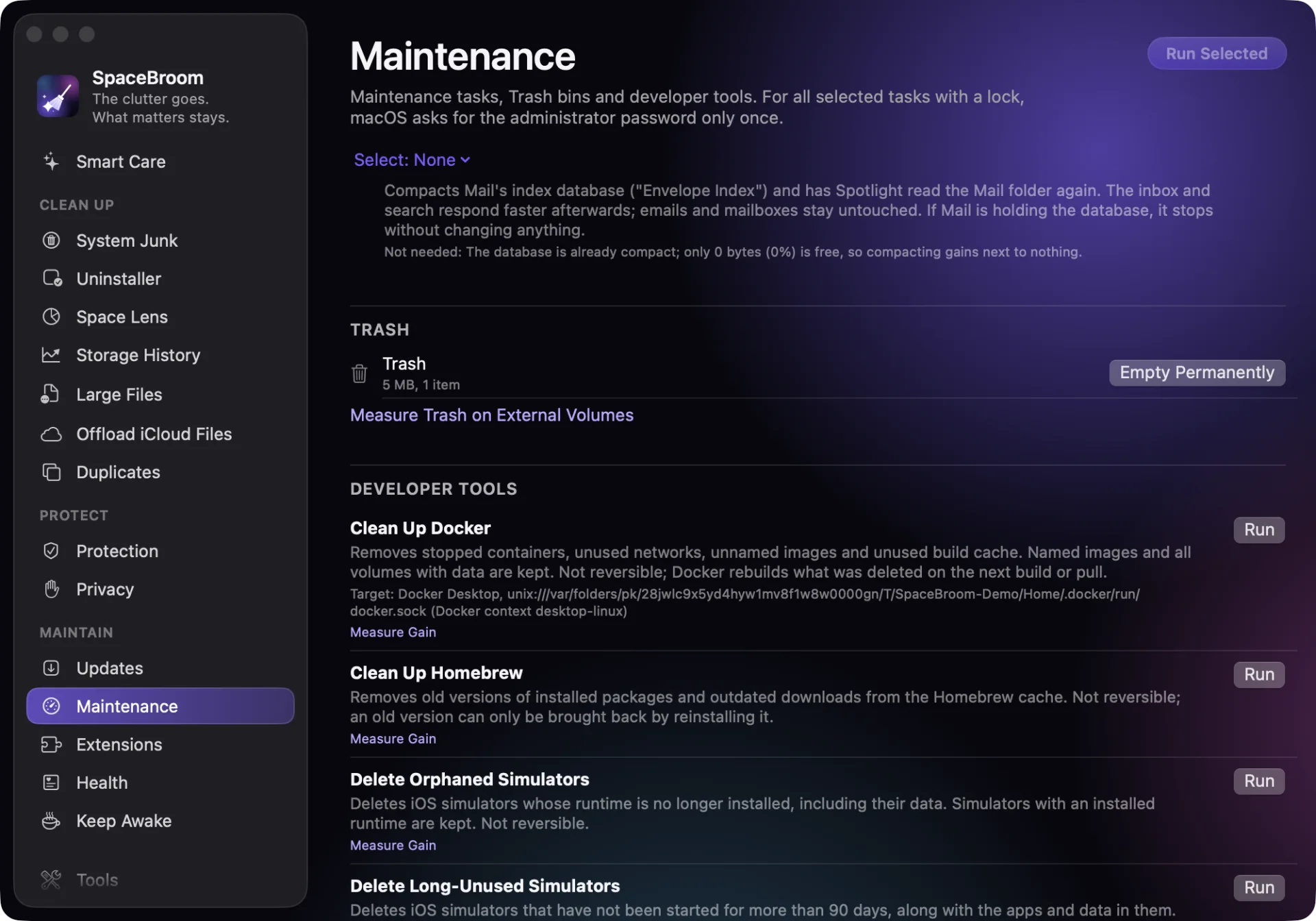
Docker, Homebrew and simulators
Every command shows before it runs.
In Maintenance, SpaceBroom cleans up Docker, Homebrew, simulators and tart's cache. "Measure Gain" shows first what would be freed, and the confirmation names the exact command line. The app reaches Docker only through a socket on this Mac; named images and volumes stay.
And everything else tools leave behind.
JavaScript.
The caches of npm, Yarn and pnpm, npx packages, the browsers of Playwright and Puppeteer, and node_modules of idle projects.
Python.
The caches of pip and uv, virtual environments of idle projects and the caches of Ruff, mypy and pytest.
Rust and Go.
target folders of idle projects, plus the Cargo registry and Go's build cache, only once cargo, rustc, rust-analyzer, go and gopls have quit.
Xcode and Swift.
DerivedData, device symbols of old versions, archives older than 180 days, simulator caches and logs, the caches of SwiftPM and CocoaPods.
Android, Gradle and Flutter.
Gradle caches and wrapper versions, emulators, unused system images and the packages of Dart and Flutter.
Editors and .NET.
Extension downloads of VS Code and related editors, caches and old versions of the JetBrains IDEs, NuGet packages.
Step by step in the guides: How to clean up DerivedData, archives and simulators on your Mac How to clean up node_modules and package caches on your Mac
Only in the version from this website: AI tools, old JetBrains versions, Android emulators and system images, the caches of uv and npx, the Gradle wrapper's versions and the developer tools in Maintenance (Docker, Homebrew, simulators, tart). The Mac App Store edition runs in Apple's sandbox; there it cannot see which files a running program uses, and it has no Maintenance.
Safety
If it runs, it stays.
- Running tools.While Xcode, the Simulator, cargo, go or a JetBrains IDE runs, its cache waits until you quit it.
- Your Git state.Whatever Git tracks stays, and so does a folder that is a repository itself. node_modules only with nothing tracked and no repository inside.
- AI sessions.Session folders only from before the oldest running session. An MCP server started by npx keeps its packages.
- Your keys.Keypairs, keystores, .p12, .p8 and SSH keys in build folders stay; the folder is cleaned around them.
- Checked twice.Right before removing, SpaceBroom checks node_modules and build folders all over again.
- Trash, not delete.Files go to the Trash and can be put back from the history. Docker, Homebrew and simulators say up front that they are permanent.
Questions from developers
Does SpaceBroom delete my source code or my projects?
No. In projects, SpaceBroom only offers folders a build or an install creates again, and only when the project has been unchanged for more than 90 days. Whatever Git tracks stays, and the folders go to the Trash.
What happens when I remove node_modules?
In the project folder, npm install, yarn, pnpm or bun bring back the same versions. That is why SpaceBroom offers node_modules only in projects under Git with a lockfile, where Git tracks nothing in node_modules.
What does SpaceBroom clean up in Docker?
Stopped containers, unused networks, unnamed images and unused build cache. Named images and all volumes stay. It cannot be undone, so the command line shows first, and the app reaches Docker only through a socket on this Mac.
Are running AI sessions touched?
No. SpaceBroom offers Claude Code's session folders only when they are older than the oldest running session, and the folders of Codex, Gemini CLI and opencode only while the tool is not running. If what runs cannot be read, the category offers nothing.
Can the Mac App Store edition do this too?
In part. It cleans up package caches, Xcode data, node_modules, build folders and local AI models. AI tools, Android emulators, the caches of uv and npx, and Docker, Homebrew and simulators are only in the version from this website.

The best time to tidy up is now.
The scan is free and shows how much space can be freed. Nothing is cleaned until you say so.
Apple automatically checked this version for malicious software and code-signing problems. It is signed by DIGITALPASSION Ltd. On first launch, macOS recognizes from this that Apple has checked it.